Showing posts with label 3d. Show all posts

Friday, April 11, 2014

Some Completed Projects Part 2/3 - Resource Buildings

Hello everyone!

This post is the second of three presenting information on a couple of projects I've completed in the last two weeks.

During a break from a C# tutorial I was playing a round on Stronghold Crusader and I was looking at the resource gathering buildings and thought, "Hmm, I wonder if I can make something like that..." I've been interested in attempting to make an RTS after Winds of Commerce, but I think I have a lot of learning to do. Anyway, I decided to let my mind drift away from C# and back into Unrealscript. I decided to try and make a stone mine that gathers up to three units of stone if there are enough workers to run the building. Here is a demo that I made for it:


I added in some rudimentary functionality to select different buildings. Ideally this would be done via a point and click mouse system, but that was not my primary focus for this project. It just uses a trace to see if the actor that was hit was a resource building, then assigns the hit building to the currentBuilding. If I were going to make an RTS this would only be a small part of the game, but it was fun to do. Learned some stuff about the trace function, and getting a specific instance of an object.

There are only a couple things I would like to add to the building. One is actual animations to show the stone being mined. Another is some indicator as to whether or not the building is fully staffed. Scaling the buildings up to the correct size would also be nice. The last thing I would probably do is add some sort of graphical interface to aid with all of the tasks.

Monday, January 6, 2014

And Now We're Back From Our Intermission!

Hey guys!

Sorry it's been so long, life has been hectic! Thankfully, my life has mellowed out a lot now, so I can get back on a regular updating schedule.

In the spare time I have had I've been dividing my time between working on that commerce game I mentioned in my last post, and helping a buddy with a game he's working on.

The premise of the trading game is you are the captain of a merchant ship. You can find more information here. You start off with a set amount of gold and you buy your first cargo with it. You then have a set amount of  'days' to go to different ports to try and make the greatest profit in that time. Each port, except the starting one will have randomized prices and quantities so each playthrough will be different. I've made some pretty good progress so far. I have the core system down for determining the value and quantity of the various goods, and I've almost finished up the information system in the game. This will allow you to get information on the different ports ahead of time, to help you plan. I still need to implement the actual buying and selling of goods though.

I've made a very simplistic mock up to give a representation of the game. To exit the trade and information windows just click them.


That's all I have for now. Once I get things a bit more organized I'll put up some interesting code bits, images, or something.

Saturday, November 2, 2013

AssetManager Is Complete!

Hey guys,

Been a while, but I am happy to say that AssetManager is as done as it is going to get. It is fully functional, and mostly pretty. It can be downloaded from here, if you want to give it a shot. The ReadMe that comes with it gives some instructions on how to use it, but almost all of it is self-explanatory.

For those of you who don't know, AssetManager is a project management tool that allows you to add projects and assets to keep track of all the things you are working on. It uses UDK for two reasons; one is because I'm too lazy to learn C++ or another language, and the second reason, ironically, is to learn how to use AS3 and Unrealscript for more complex tasks. Due to using UDK it is probably a much bigger file size than it needs to be. As I went through this project I did learn a lot about using config files, spawning items in AS3, and just managing a dynamic system in general. It was a  lot of fun to make, but I'm glad it's done. After working on that immediately after PrepHelp I was getting pretty burnt out on looking at mostly the same code.

Unlike PrepHelp I tried to make graphics for this. Overall I am unhappy with them, but it looks better than my placeholder graphics. If there is enough interest in the program I'll probably redo the graphics and fix the one (potential) bug I know of. The one thing I do like is the logo. It is kind of plain, but when it is smaller it looks better without realistic textures, which was what I was originally intending to do.


The only bug I can foresee is that you can add an item to a project even if there is no projects. Should have thought of that before, but I didn't. I know it sounds lazy to not go back and fix it, especially since it would be around 3 lines of code...and you're right! I want to be done with it for now, since it is starting to no longer be fun to work on. Since I'm not getting paid I figured that means it's a good time to wrap it up. Also, when your internet is so slow it takes 30-60 minutes to upload a file less than 200mb ...

I don't think I have anything else to add that isn't in the ReadMe. Now that this is out of the way I plan on working on a isometric, commerce strategy game. Just something small to see if I can do it and to get more practice with another type of game.

Wednesday, September 4, 2013

A Small Side Project - PrepHelp

Hey there!

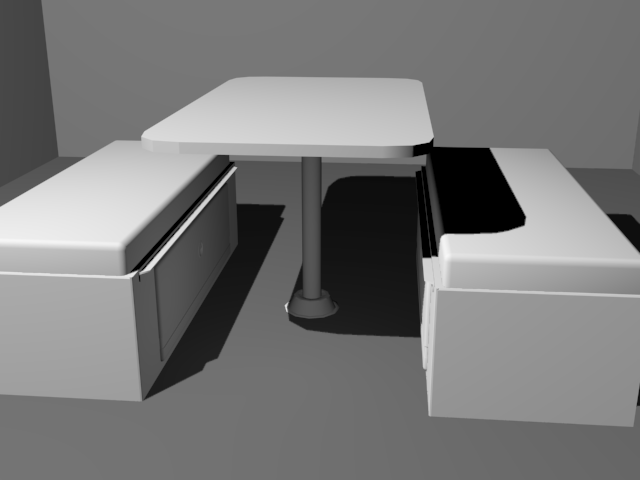
Since we are waiting on models for N'Ferno, the firefighting game, and some more of the code base I decided to do a couple personal projects. I decided to start a small modeling project, and a larger code/design project. For the modeling I started modeling components of a camper van I own. I figured it was something I have ready access to and should be a nice little project. I wanted to do somewhat low poly, though have enough to make the objects look nice without going into a lot of detail. I finished up the dinette(the table and seats) and am working on the cabinet where the stove, fridge, sink, and electrical stuff is.

Here is the dinette:


When I get done with all of the models I want to go through and texture everything. Since I think texturing is my weakest point, this should be a good little exercise.

For my other project I had an idea to make a program to help people keep track of their long term food stores and medical supplies. This could be useful if you are prepping for the apocalypse or if you have food stored away in case of flood/hurricane/tornado or other natural disaster. The program would offer basic functionality. You would have the ability to add items into either medical or food items. Each item will have an expiration date, quantity, subcategory, and name. When viewing the list it will let you know if a particular item is getting close to its expiration date. There will also be a search function where you can search by subcategory(i.e. under food would be: grains, beans, meat, etc...) to help keep track of what items you have.

Due to the fact I haven't learned any other language besides UnrealScript and AS3 I decided to make it using UDK. I realize it isn't the best platform to make something like that in, but it is what I know. Eventually I will sit down and learn C++ or another language, but for now I'm working on expanding my knowledge of how to do things using UDK.

When I have the main body built I will post some pictures and possibly some code that I used to achieve it.

Monday, August 26, 2013

Finally An Update!

I feel like I'm apologizing a lot in my posts recently for the irregular updates. I have indeed been working on things in the past month, but due to work and complications with where we are staying I haven't had much time to write up a post. I won't bore you with too many details, but my internet is very slow here...frustratingly slow.

Anyway, I finished up with the menus for N'Ferno and showed them to the rest of Pixel Jargon. They were met with approval, with just a few tweaks that I forgot about. Since then I have put them aside until we get some finalized code for a couple more features. There was only one major bug with the menus and I haven't been able to figure out what is causing it. It was a problem that we ran into when we were making menus and such for Umbra, but I can't remember if we fixed it or not. Basically, if you are holding a movement key and you pause the game, when you unpause the game the pawn will continue running in the direction you were pressing until you hit that button again. I've looked on the Epic Games' forums, but either we're the only ones to encounter this, or I'm not using the right keywords.

Also put on the back burner was my experiment with the custom input ini's. I posted on the forums asking if anyone had any solutions to the mouse problem I was experiencing, but not a single person responded. It seems like none of the problems I have ran into have been asked about in the forums.

Since I wasn't really working on the menus for the time being I decided to help the modeling team a little. I was assigned a pretty interesting street lamp. Given two reference images I had to come up with a design and do a low poly model of it. I realized it is really hard to model something that has all rounded edges and try and keep it under 100 polygons. This meant very little detail once the basic shape was done. Since I was so disheartened by the lack of detail in it I decided to do a slightly higher poly version for myself. This ended up being around 1500 polys, but I was able to explore the concept a lot more and I found a design I liked better than my original one.

Here are the reference images I was given:

This was the original composite reference I made t get started:


And this is what I came up with for my higher poly model:

The texture is just a sub-object material I put on so I could see the different elements better. I might add more on to this at a later date, but for now I am done with it. It served its purpose in helping me visualize what I wanted the very low poly version to look like.

That's all I have for now!

Monday, June 3, 2013

A Proof Of Concept And An Old Datapad

Hey guys,

Over the past week I've been doing a small proof of concept for a game I'm thinking about starting development on. The working title for the game is Crazy Steve. I have the core game design document done for it, I just have to create an asset list, animation list, and put in some initial concepts for the menus/HUD.

Here's the synopsis of the game: Crazy Steve is a top-down, horde survival game. You play as Crazy Steve, an aging man protecting his dying wife from the Grim Reaper and its minions. In between each level there will be stills of their lives together before this point. You must defend yourself and your trailer. If either one falls, you lose. You win by defeating all the minions in each round, and eventually defeating the Grim Reaper.

Here is the proof of concept so far, though I apologize the graphics are nowhere near pretty. This proof of concept served two purposes; the first was to get a rough idea of what it would take to make this game in Construct2, and the other was to flesh out the enemy classes to get a better understanding of what I am envisioning. Overall I like the enemies as they are, although the Warlock(The ones who shoot things at you) may need to be toned down just a little. Just click on the window to play. If the game is too small you can click here and it will open it in a new tab/window in a larger size.

The controls are: WASD or the arrow keys to move, the left mouse button to fire, and R to reload.
P will pause the game.

That has been taking up most of my time, along with getting ready to move. As I was looking through my old documents I found a datapad I modeled a while ago. It was modeled off one from the Star Wars universe. Here is the model and reference photo. The reference photo is courtesy of Wookiepedia.


It doesn't quite have the same proportions and the textures are way off. It's interesting to go back and look at projects you worked on a long time ago and see how far you've progressed. 

That's all I have for you guys for now!

Sunday, May 26, 2013

Learning Challenge, AS3 Style!

Hey guys!

After my last post I began looking at what I would need to do in order to get the visuals for the action queue to work. I decided I wanted it to look similar in style to the example below. In this example the player wants to use a key, move, talk to a person, then move again. The action that is being performed is scaled larger and is in the 'highlighted' slot on the bar.
This seemed pretty easy in theory, just spawn an icon tot he left of the last one. When one action is completed move the remainder to the right and make the 1st action icon larger. Instead of diving in to this I decided to do a little challenge. The challenge was to make an inventory system that could support a dynamic amount of items. I also wanted to make it scrollable. Now this doesn't seem like it would help with the action queue problem, but both involve spawning movieclips in a line and setting parameters from an array. The last will be important because the actions will be stored in an array and that information will be used to spawn the correct icon. I added the scrolling challenge since I plan on using a system very similar to the challenge if I redo my crafting page, or add an inventory system to my menu collection.

The challenge only took me a couple hours of work, though I had a couple days where both of my computers were out of commission. Many thanks to Craig Campbell over at School of Flash, and Ali Qureshi for their tutorials. Between the two I was able to get the bulk of the logic figured out and implemented. I ended up using Craig's custom scrollbar and masking approach rather than the scrollpane as in Ali's example so I could have more control over the look of it. Ali has a very well commented block of code for spawning the desirable amount of movieclips from AS3. I used this primarily to get the inventory items to spawn. Overall I learned a lot about spawning movieclips and setting parameters using a for loop, and what math is needed to get a particular block of content to scroll. Here is the final product of my self-challenge: (Go ahead, click on it! It's interactive!)


Here is the Actionscript3 code that makes it work: Not too different from the tutorials though.

import flash.events.MouseEvent; stop(); //Movieclip vars var desiredMCs:int = 20; var nextYPos:int = 10; var i:int = 0; var invoCont:invoContainer; var invoArray:Array = ["Bread", "Milk", "Juice", "Steak", "Pinapple", "Carrot", "Ginger", "Parsley", "Eggs", "Peppers", "Onions", "Porkchops", "Chicken Nuggets", "Salmon", "Prickly Pear Cactus", "Butter Cup Squash", "Spam", "Red Leaf Lettuce", "Cornbread", "Cheeseburger"]; //Scrollbar vars var rect:Rectangle; var scrollerMinY:Number = slider_mc.handle_mc.y; var containerMaxY:Number; var padding:Number = 20; slider_mc.handle_mc.buttonMode = true; slider_mc.handle_mc.addEventListener(MouseEvent.MOUSE_DOWN, dragHandle); popup_mc.drawInvo_btn.addEventListener(MouseEvent.CLICK, drawInvo); back_btn.addEventListener(MouseEvent.CLICK, removeInvoCont); //Inventory functions function drawInvo(e:MouseEvent) { desiredMCs = popup_mc.inputField_txt.text; if(desiredMCs >= 1 && desiredMCs <= 20) { invoCont = new invoContainer(); invoCont.x = 170; invoCont.y = 30; mainICont_mc.addChild(invoCont); containerMaxY = invoCont.y; popup_mc.visible = false; for (i = 0; i < desiredMCs; i++) { var item:invoItem = new invoItem(); item.x = 10; item.y = nextYPos; item.name = "invoItem" + i; item.itemName_txt.text ="Item Name: " + invoArray[i]; item.itemType_txt.text ="Item Number: Item " + (i +1); item.itemDesc_txt.text =""; invoCont.addChild(item); nextYPos += item.height + 1; } for (i = 0; i < invoCont.numChildren; i++) { trace ("name: " + invoCont.getChildAt(i).name + "\t type:" + invoCont.getChildAt(i)); } //If there is not enough content to scroll, disable it if(desiredMCs <= 3) { slider_mc.visible = false; } else { slider_mc.visible = true; } } else { //Do something to show an invalid number } } function removeInvoCont(e:MouseEvent) { //Removing the existing inventory mainICont_mc.removeChild(invoCont); //Reseting variables for a new test slider_mc.handle_mc.y = 3; nextYPos = 10; popup_mc.inputField_txt.text = ""; popup_mc.visible = true; } //Slider Functionality function dragHandle(e:MouseEvent):void { rect = new Rectangle(0, 3, 0, 345); slider_mc.handle_mc.startDrag(false, rect); stage.addEventListener(MouseEvent.MOUSE_UP, releaseHandle); slider_mc.handle_mc.addEventListener(Event.ENTER_FRAME, scrollInvo); } function scrollInvo(e:Event):void { var scrollerRange:Number = rect.height; var contentRange:Number = invoCont.height - mask_mc.height + padding; var percentage:Number = (slider_mc.handle_mc.y - scrollerMinY) / scrollerRange; var targetY:Number = containerMaxY - percentage * contentRange; invoCont.y = targetY; } function releaseHandle(e:MouseEvent):void { slider_mc.handle_mc.stopDrag(); slider_mc.handle_mc.removeEventListener(Event.ENTER_FRAME, scrollInvo); }

That's about it. It was a nice little challenge that I think will help me with creating the action queue visuals when I get around to them, plus a better inventory management system. For bearing with me here is an point pickup inspired by the 2007 game Monster Madness: Battle for Suburbia!
No texture, sorry!

Sunday, May 12, 2013

Back After A Short Respite

Hello Everyone!

Sorry it has been a while, I took some time off after Super Monster Dance Party to relax a little so I can start on new projects with renewed energy. In this down time I've been working on a 3D scene for two of our classes. The project is creating a culture and an environmental issue that it faces. We were allowed to work in groups for this so I teamed up with Andrew Talarico and Ryan Hess. We have two cultures and three environmental issues. Anyway, one of the cultures is called Praxis and the other is Ryatopia. I decided to create some tools that the Praxians might use. It started out with just some rope and a barrel, but I thought that they didn't have any context and wouldn't do the Praxian culture justice. I just kept adding items to the scene until I thought it felt right. Praxis is a colony that is built unto/into the cliff faces of huge a crevice. All of these objects are on a suspended platform on one of the cliffs. I ended up with two variations(Click on them for bigger images):
A still of Praxian life - Pickaxe only

A still of Praxian life - Pickaxe and Shovel

I think I like the one without the shovel better, simply because I couldn't get the shovel head to not look really flat due to the positioning of the lights. I don't want to move the lights since I like the rest of the shadows. I do like the added variety that the shovel provides though. It makes it look like they use more than one tool. 

The texturing isn't anywhere near perfect,but I think it gets the point across fairly well. Still trying to get the texturing thing down... Seems like a lot of times it is harder than actually modeling the object. 

That's what I've been working on for the most part. I've been a little restricted  when it comes to Umbra or other UDK based projects since UDK decided to stop working correctly. I'm in the process of doing a re-install to see if that fixes it. If it does fix it then it back to trying to get level streaming volumes to work and programming a queue system for actions/attacks/events. 

Thursday, April 18, 2013

An Uneventful Week Or Two

Hello everyone! Sorry I haven't posted in quite a while. I've been in somewhat of a lull in all the projects I'm working on, so I'll catch you up on what has happened.

For Umbra, Ryan Olson said he has Zone 1 ready to rock with enemies. As soon as we get it packaged up and distributed to the class we can begin playtesting while he places the enemies into the rest of the zones.

As for the crating system, well I decided to take a break from it before starting on the larger inventory system that I want before I finish up the crafting button.

Super Monster Dance Party has been pushed back a couple days due to lack of songs. We ended up having to purchase some songs to use, since both of the guys working on the music ended up being too busy to complete the rest. We do have one song that Dan Langford did complete, and it sounds pretty good. We are waiting for  permission on two of the other songs that we want to use. The other three artists got back to us within a day granting us permission to use their songs. Nice of them to let us use the songs, thank you! Other than that we have just been working out some of the last bugs and cleaning up some of the art assets. We should be still on track for our end of the month release, it will all depend on how smoothly it exports and works on different phones. Dave Troyer finished up the final monster, so here is a menacing picture of him:


Kind of creeps me out...


I guess that is all there is for now. One of these days I'll write up my thoughts on some of the...management, for lack of a better word, of several projects the group is working on at the moment.

Until then, farewell!

Saturday, April 6, 2013

Sorry For The Long Post - SMDP, Umbra, GenericMenus

Hello everyone!

I have a couple updates on Super Monster Dance Party, Umbra, and that crafting page I was working on.

I'll start off with Super Monster Dance Party. We're inching ever closer to completion. Dave Troyer has been working hard getting the animations for the monsters done. So far he has 4 out of the 5 monsters completed. Here they are:


As you can see the art style is quite a bit different from the one the monsters were originally styled in. Due to animation limitations Dave decided to go with this style for the monsters.

While setting up the animations to play at the right times in the levels I came across a pretty nifty piece of code for Construct2. It's an expression called tokenat(Variable, Index, Deliminator). I'll explain the three parameters in a second.


If you want it to be more dynamic put tokencount(Variable,Deliminator) in random() instead of a number.
Then it will always update if you add new items.


  • Variable: What this does is you declare the names of the strings you want to access in a global variable. In my example  I am putting the names of the animation sets for the confetti, so I have Red:Blue:Green:Yellow as my text variable separated by a : 

  • Index: For the index parameter this is which substring you want to pick. For instance, if I wanted to get the Blue substring I would have to put 1 as the index(It is a base-0 system where the first object is object 0). If I wanted it to pick a random name out of that list I could put int(random(4)) in the Index spot. This will pick a random number from 0-3 which corresponds with how many names I have in the variable. The in() just converts the random number to an integer, so we don't have decimals since that would throw an error.

  • Deliminator: The Deliminator parameter is pretty simple. It is just telling tokenat() what character(s) were used to separate the substrings in the main variable. I chose to use : because it is easy to put in and it looks nice.
This makes it really simple to play a random animation. The way you would have to achieve the same thing would be to have this setup: 

Takes up a lot more events. That's bad if you are using the free version.


Forward unto Umbra! I figured out that changing the loading video is pretty simple. All you have to do is replace this movie with a Bink video with the same name, or change the name one of the default properties(I'm not sure which one).

If you add a different movie don't forget to set in the default ini's


To make a Bink video you need to download Bink video converter from Rad Game Tools, it's free. Then convert your video, there are several tutorials out there that explain how to do it. Beware: it seems to be pretty picky on what videos it can convert. I've had no luck converting any movies, though my roommate has been able to convert a few. It says it prefers uncompressed .avi or QuickTime videos, though I didn't have any luck with any of the 5-6 video formats I tried. 

Also note that just replacing the movie will not get rid of the tips and map name that show up on loading screens. To do this you have to create your own ViewportClient class and stub out the DrawTransition() function, like so:

class UmbraViewportClient extends GameViewportClient; // Don't draw loading hints or "Precaching..." function DrawTransition(Canvas Canvas) { } defaultproperties { }

Then assign your new ViewportClient to be the default in DefaultEngine.ini:

[Engine.Engine] GameViewportClientClassName=UmbraGame.UmbraViewportClient

If anyone knows how to stop the loading map from switching maps right after the next map is finished loading I would love to know. In other words, let the Bink video finish playing before it changes maps.

See my awesome super-quick models?


I made quite a bit of progress on the crafting page since my last post. I started off with making sure the SWF file updated the resource and recipe inventories correctly and only allowed the player to pick up a maximum of 5 resources and 3 recipes. Once I got them to display correctly(that took a lot of frustrating work, trying to igure out how to work with arrays in both AS3 and UnrealScript) I was able to start working on getting the crafting system in working order. Now you are able to place a recipe in the recipe slot, then place the appropriate resource slot. if a resource/recipe is in use by the system it will be grayed out and unclickable. 

Adding the last iron needed

Once you have the recipe and all the ingredients you'll be able to hit "Craft! and create the item. This feature is still in the works, though I have the base code for it already. I'm waiting to implement this until i get a second dedicated inventory screen, that way you'll be able to see what you crafted. I did implement a drop feature which allows you to select a resource/recipe and drop it on the ground. 

I think once I get this done and I'm feeling a bit ambitious I'll shift most of the work over to UnrealScript instead of shared between both, since UnrealScript is quite a bit faster than AS3. I should have been doing that from the start, but for some reason I was duplicating work again. At least it is working so far, that's the main thing right?

Well, that's all I have for now. Till we meet again!

Thursday, March 28, 2013

Been A While! - SMDP, Umbra, Generic Menus

Hey everyone, sorry it's been a while.

I don't have too much of an update on Super Monster Dance Party. After doing some more testing and research I found out that PhoneGap would not work for us. It seems that the sound issues we were encountering is a pretty serious issue with it and so far there haven't been too many effective workarounds. I did find a good workaround for the sound issue using CocoonJS, it was simply a matter of changing an action from "Silence" to "Volume -200db" The only problem with just using the volume is that with "Silence" it would mute and stop further sounds from starting, but this is so trivial for our game that is won't be an issue. After we got the CocoonJS file exported I got to test SMDP on several different phones, which was pretty exciting. So now I'm taking a step back and letting Dave Troyer and David Fuson add in all of the art assets so we can see how much left of the game we need and what needs refining. I think we are still fairly on track for our end of April release, I just hope we don't run into many bugs once we get everything in.

We're in our last quarter for school, and Umbra is getting wrapped up as well. We got Zone 1 to our lead programmer of sorts, Ryan Olson, so he can start putting enemies in and testing them. After they get in all that is left content wise is playtesting and any tweaks we need to make from there. While that is being set up Andrew Talarico has been working on getting some pretty cool looking animations for the main intro, as well as the ending scene. Currently, I'm figuring out how to add our own custom loading screens and getting the streaming between levels working correctly. Should be pretty easy I think, just making a loading animation and replacing the existing video with ours.

Since I'm not working as hard on SMDP as I was previously I decided to start working on a custom crafting screen using ScaleForm. I ran into all sorts of things I have/had to learn in order to get this working. I ended up having to figure out how to add my own inventory system so I could reference my items correctly. I also ended up making some new pickups and gained a better understanding of how extending classes works. One interesting thing I found was how to pass an entire array from UnrealScript to ActionScript3. The process involves a for loop that goes through all of the items in the array, saving them to a temporary array which gets shoved into a GFxObject and passed to ActionScript3. Here's the chunk of code for it:
function UpdateResourceInventory() { local byte i; local GFxObject DataProvider; local GFxObject TempObj; //Creating the array that will be passed DataProvider = CreateArray(); //Setting each element of the array to include all the variables in //In the Item struct. i is what elment of the array we are on. for (i = 0; i < GP.ResourceInventory.length; i++) { TempObj = CreateObject("Object"); TempObj.SetString("ItemName", GP.ResourceInventory[i].ItemName); TempObj.SetString("ItemType", GP.ResourceInventory[i].ItemType); TempObj.SetString("ItemSubType", GP.ResourceInventory[i].ItemSubType); TempObj.SetString("ItemDesc", GP.ResourceInventory[i].ItemDesc); TempObj.SetInt("ItemID", GP.ResourceInventory[i].ItemID); DataProvider.SetElementObject(i, TempObj); } //Setting the ActionScript3 array "resourceInventory" equal to //DataProvider RootMC.SetObject("resourceInventory", DataProvider); //Calling the function to update it Flash-side ActionScriptVoid("_root.updateResourceInventory"); }

Overall the inventory system is pretty hacky, but it works. I'll have to go through and look at the basic inventory system that UDK has and see if there is anything I can take from that and adapt it. I'll post updates as well. If anyone knows of a good tutorial for that sort of stuff let me know!

Till next time!

Tuesday, March 12, 2013

Some News! -SMDP, Umbra

Over the past week for SMDP I've been going through the events and trying to optimize them more. I also did some preliminary testing with the CocoonJS, as well as the AppMobi, export options. Both had some issues that may make them unusable as export options for this particular game. We're still trying to work it out, and I still have to try exporting with PhoneGap. That probably means very little to anyone, but oh well. Yesterday we decided to take the infinite mode out of the game due to the event system not being able to processes it exactly as we want. If we have some extra time I'll try a theory I thought of while typing this out.

Speaking of extra time, we has set an expected release date of April 14th. That's pretty soon, but the events are almost completely done and the David Fuson is working pretty fast on the art assets. There are only two things that I can think of that will delay the release date. One is not being able to work around the exporter limitations, and the other is if we don't have our music and sound assets ready. Both Dan Langford and Corey Farmer have been pretty busy with schoolwork lately and we're not sure how far they've gotten.

As far as Umbra is concerned, we have it mostly done! Last week we started compiling all of the zones together. All the zones are nearly done, mostly just waiting to get the enemies placed so we can start testing. We did run into quite a few issues getting maps to open on other computers. We are going to try and put it all on one computer and see how things go from there. I'm still waiting for the intro anims so I can finish up the zone 1 intro. Corey was almost done with them a couple days ago, so I'll have to check up on them.

We're getting there!

Sunday, March 3, 2013

Umbra and Stuff! - Umbra, SMDP

Hey there!

Over the past week or so I've been working on both Umbra and SMDP. For Umbra I have the intro to Zone 1 complete except for getting the custom animations for our main character. Once I get those from Corey Farmer I should just be able to plug in the names and be 100% complete. Once I get them I'll try and figure out recording from Matinee and upload the intro.

I think I've made a lot of progress on SMDP in the past couple days. I wasn't satisfied with its performance, it had some issues that didn't really hinder gameplay, but were pretty annoying. The main one was when you clicked on a button and there was another button in the same spot(Like on page that was getting switched to) it would hit that button as well. Because of this I ended up restructuring the entire infrastructure of the game. In the end the execution of the code is cleaner, though there is more stuff in the editor. I also added the rest of the story mode levels and made it so to unlock the final boss for use in infinite and free play you have to beat the last level in story mode.

Thanks to David Fuson we have quite a few of the art assets done. Dave Troyer has been working on getting the sprite sheets all set up so the monsters dance in the levels. Corey has been working on composing some songs, and is off to a great start. I'm currently working on getting the game to save and load your progress. I have that working for one stat, now I just need to add them for the rest of the levels.

Well, back to work! Thanks for reading!