Showing posts with label 3ds max. Show all posts

Friday, April 11, 2014

Some Completed Projects Part 2/3 - Resource Buildings

Hello everyone!

This post is the second of three presenting information on a couple of projects I've completed in the last two weeks.

During a break from a C# tutorial I was playing a round on Stronghold Crusader and I was looking at the resource gathering buildings and thought, "Hmm, I wonder if I can make something like that..." I've been interested in attempting to make an RTS after Winds of Commerce, but I think I have a lot of learning to do. Anyway, I decided to let my mind drift away from C# and back into Unrealscript. I decided to try and make a stone mine that gathers up to three units of stone if there are enough workers to run the building. Here is a demo that I made for it:


I added in some rudimentary functionality to select different buildings. Ideally this would be done via a point and click mouse system, but that was not my primary focus for this project. It just uses a trace to see if the actor that was hit was a resource building, then assigns the hit building to the currentBuilding. If I were going to make an RTS this would only be a small part of the game, but it was fun to do. Learned some stuff about the trace function, and getting a specific instance of an object.

There are only a couple things I would like to add to the building. One is actual animations to show the stone being mined. Another is some indicator as to whether or not the building is fully staffed. Scaling the buildings up to the correct size would also be nice. The last thing I would probably do is add some sort of graphical interface to aid with all of the tasks.

Saturday, November 2, 2013

AssetManager Is Complete!

Hey guys,

Been a while, but I am happy to say that AssetManager is as done as it is going to get. It is fully functional, and mostly pretty. It can be downloaded from here, if you want to give it a shot. The ReadMe that comes with it gives some instructions on how to use it, but almost all of it is self-explanatory.

For those of you who don't know, AssetManager is a project management tool that allows you to add projects and assets to keep track of all the things you are working on. It uses UDK for two reasons; one is because I'm too lazy to learn C++ or another language, and the second reason, ironically, is to learn how to use AS3 and Unrealscript for more complex tasks. Due to using UDK it is probably a much bigger file size than it needs to be. As I went through this project I did learn a lot about using config files, spawning items in AS3, and just managing a dynamic system in general. It was a  lot of fun to make, but I'm glad it's done. After working on that immediately after PrepHelp I was getting pretty burnt out on looking at mostly the same code.

Unlike PrepHelp I tried to make graphics for this. Overall I am unhappy with them, but it looks better than my placeholder graphics. If there is enough interest in the program I'll probably redo the graphics and fix the one (potential) bug I know of. The one thing I do like is the logo. It is kind of plain, but when it is smaller it looks better without realistic textures, which was what I was originally intending to do.


The only bug I can foresee is that you can add an item to a project even if there is no projects. Should have thought of that before, but I didn't. I know it sounds lazy to not go back and fix it, especially since it would be around 3 lines of code...and you're right! I want to be done with it for now, since it is starting to no longer be fun to work on. Since I'm not getting paid I figured that means it's a good time to wrap it up. Also, when your internet is so slow it takes 30-60 minutes to upload a file less than 200mb ...

I don't think I have anything else to add that isn't in the ReadMe. Now that this is out of the way I plan on working on a isometric, commerce strategy game. Just something small to see if I can do it and to get more practice with another type of game.

Wednesday, September 4, 2013

A Small Side Project - PrepHelp

Hey there!

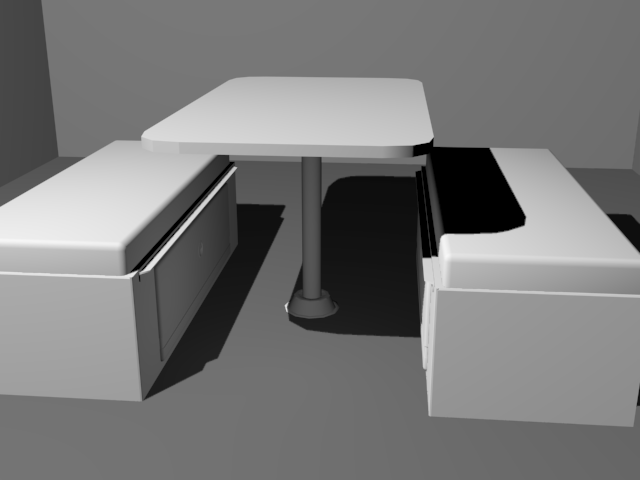
Since we are waiting on models for N'Ferno, the firefighting game, and some more of the code base I decided to do a couple personal projects. I decided to start a small modeling project, and a larger code/design project. For the modeling I started modeling components of a camper van I own. I figured it was something I have ready access to and should be a nice little project. I wanted to do somewhat low poly, though have enough to make the objects look nice without going into a lot of detail. I finished up the dinette(the table and seats) and am working on the cabinet where the stove, fridge, sink, and electrical stuff is.

Here is the dinette:


When I get done with all of the models I want to go through and texture everything. Since I think texturing is my weakest point, this should be a good little exercise.

For my other project I had an idea to make a program to help people keep track of their long term food stores and medical supplies. This could be useful if you are prepping for the apocalypse or if you have food stored away in case of flood/hurricane/tornado or other natural disaster. The program would offer basic functionality. You would have the ability to add items into either medical or food items. Each item will have an expiration date, quantity, subcategory, and name. When viewing the list it will let you know if a particular item is getting close to its expiration date. There will also be a search function where you can search by subcategory(i.e. under food would be: grains, beans, meat, etc...) to help keep track of what items you have.

Due to the fact I haven't learned any other language besides UnrealScript and AS3 I decided to make it using UDK. I realize it isn't the best platform to make something like that in, but it is what I know. Eventually I will sit down and learn C++ or another language, but for now I'm working on expanding my knowledge of how to do things using UDK.

When I have the main body built I will post some pictures and possibly some code that I used to achieve it.

Monday, August 26, 2013

Finally An Update!

I feel like I'm apologizing a lot in my posts recently for the irregular updates. I have indeed been working on things in the past month, but due to work and complications with where we are staying I haven't had much time to write up a post. I won't bore you with too many details, but my internet is very slow here...frustratingly slow.

Anyway, I finished up with the menus for N'Ferno and showed them to the rest of Pixel Jargon. They were met with approval, with just a few tweaks that I forgot about. Since then I have put them aside until we get some finalized code for a couple more features. There was only one major bug with the menus and I haven't been able to figure out what is causing it. It was a problem that we ran into when we were making menus and such for Umbra, but I can't remember if we fixed it or not. Basically, if you are holding a movement key and you pause the game, when you unpause the game the pawn will continue running in the direction you were pressing until you hit that button again. I've looked on the Epic Games' forums, but either we're the only ones to encounter this, or I'm not using the right keywords.

Also put on the back burner was my experiment with the custom input ini's. I posted on the forums asking if anyone had any solutions to the mouse problem I was experiencing, but not a single person responded. It seems like none of the problems I have ran into have been asked about in the forums.

Since I wasn't really working on the menus for the time being I decided to help the modeling team a little. I was assigned a pretty interesting street lamp. Given two reference images I had to come up with a design and do a low poly model of it. I realized it is really hard to model something that has all rounded edges and try and keep it under 100 polygons. This meant very little detail once the basic shape was done. Since I was so disheartened by the lack of detail in it I decided to do a slightly higher poly version for myself. This ended up being around 1500 polys, but I was able to explore the concept a lot more and I found a design I liked better than my original one.

Here are the reference images I was given:

This was the original composite reference I made t get started:


And this is what I came up with for my higher poly model:

The texture is just a sub-object material I put on so I could see the different elements better. I might add more on to this at a later date, but for now I am done with it. It served its purpose in helping me visualize what I wanted the very low poly version to look like.

That's all I have for now!

Monday, June 3, 2013

A Proof Of Concept And An Old Datapad

Hey guys,

Over the past week I've been doing a small proof of concept for a game I'm thinking about starting development on. The working title for the game is Crazy Steve. I have the core game design document done for it, I just have to create an asset list, animation list, and put in some initial concepts for the menus/HUD.

Here's the synopsis of the game: Crazy Steve is a top-down, horde survival game. You play as Crazy Steve, an aging man protecting his dying wife from the Grim Reaper and its minions. In between each level there will be stills of their lives together before this point. You must defend yourself and your trailer. If either one falls, you lose. You win by defeating all the minions in each round, and eventually defeating the Grim Reaper.

Here is the proof of concept so far, though I apologize the graphics are nowhere near pretty. This proof of concept served two purposes; the first was to get a rough idea of what it would take to make this game in Construct2, and the other was to flesh out the enemy classes to get a better understanding of what I am envisioning. Overall I like the enemies as they are, although the Warlock(The ones who shoot things at you) may need to be toned down just a little. Just click on the window to play. If the game is too small you can click here and it will open it in a new tab/window in a larger size.

The controls are: WASD or the arrow keys to move, the left mouse button to fire, and R to reload.
P will pause the game.

That has been taking up most of my time, along with getting ready to move. As I was looking through my old documents I found a datapad I modeled a while ago. It was modeled off one from the Star Wars universe. Here is the model and reference photo. The reference photo is courtesy of Wookiepedia.


It doesn't quite have the same proportions and the textures are way off. It's interesting to go back and look at projects you worked on a long time ago and see how far you've progressed. 

That's all I have for you guys for now!

Sunday, May 12, 2013

Back After A Short Respite

Hello Everyone!

Sorry it has been a while, I took some time off after Super Monster Dance Party to relax a little so I can start on new projects with renewed energy. In this down time I've been working on a 3D scene for two of our classes. The project is creating a culture and an environmental issue that it faces. We were allowed to work in groups for this so I teamed up with Andrew Talarico and Ryan Hess. We have two cultures and three environmental issues. Anyway, one of the cultures is called Praxis and the other is Ryatopia. I decided to create some tools that the Praxians might use. It started out with just some rope and a barrel, but I thought that they didn't have any context and wouldn't do the Praxian culture justice. I just kept adding items to the scene until I thought it felt right. Praxis is a colony that is built unto/into the cliff faces of huge a crevice. All of these objects are on a suspended platform on one of the cliffs. I ended up with two variations(Click on them for bigger images):
A still of Praxian life - Pickaxe only

A still of Praxian life - Pickaxe and Shovel

I think I like the one without the shovel better, simply because I couldn't get the shovel head to not look really flat due to the positioning of the lights. I don't want to move the lights since I like the rest of the shadows. I do like the added variety that the shovel provides though. It makes it look like they use more than one tool. 

The texturing isn't anywhere near perfect,but I think it gets the point across fairly well. Still trying to get the texturing thing down... Seems like a lot of times it is harder than actually modeling the object. 

That's what I've been working on for the most part. I've been a little restricted  when it comes to Umbra or other UDK based projects since UDK decided to stop working correctly. I'm in the process of doing a re-install to see if that fixes it. If it does fix it then it back to trying to get level streaming volumes to work and programming a queue system for actions/attacks/events.