Hey guys,
Been a while, but I am happy to say that AssetManager is as done as it is going to get. It is fully functional, and mostly pretty. It can be downloaded from here, if you want to give it a shot. The ReadMe that comes with it gives some instructions on how to use it, but almost all of it is self-explanatory.
For those of you who don't know, AssetManager is a project management tool that allows you to add projects and assets to keep track of all the things you are working on. It uses UDK for two reasons; one is because I'm too lazy to learn C++ or another language, and the second reason, ironically, is to learn how to use AS3 and Unrealscript for more complex tasks. Due to using UDK it is probably a much bigger file size than it needs to be. As I went through this project I did learn a lot about using config files, spawning items in AS3, and just managing a dynamic system in general. It was a lot of fun to make, but I'm glad it's done. After working on that immediately after PrepHelp I was getting pretty burnt out on looking at mostly the same code.
Unlike PrepHelp I tried to make graphics for this. Overall I am unhappy with them, but it looks better than my placeholder graphics. If there is enough interest in the program I'll probably redo the graphics and fix the one (potential) bug I know of. The one thing I do like is the logo. It is kind of plain, but when it is smaller it looks better without realistic textures, which was what I was originally intending to do.
The only bug I can foresee is that you can add an item to a project even if there is no projects. Should have thought of that before, but I didn't. I know it sounds lazy to not go back and fix it, especially since it would be around 3 lines of code...and you're right! I want to be done with it for now, since it is starting to no longer be fun to work on. Since I'm not getting paid I figured that means it's a good time to wrap it up. Also, when your internet is so slow it takes 30-60 minutes to upload a file less than 200mb ...
I don't think I have anything else to add that isn't in the ReadMe. Now that this is out of the way I plan on working on a isometric, commerce strategy game. Just something small to see if I can do it and to get more practice with another type of game.
Saturday, November 2, 2013
Friday, October 11, 2013
One Project Completed - PrepHelp
Hello everyone!
I should have posted this a little earlier, but time got away from me. I finished up the code stuff for PrepHelp. It now is a fully functional little program. Yippie! You can download it from here, but be warned: I have not improved the visuals past the mock ups I made for testing. I was planning on it but another idea came up that I will explain a little later. I did, however, provide a little instruction image pointing out what some of the more obscure, unlabeled buttons do.
I believe on my last post all I had left to do was set up the search feature, as well as implement the medical item category as well. The latter was very simple, just copy, paste, change a few names, and done. The search function...at first I thought it'd be easy, just do a check against the types and it will find them and sort them. Well, I was partially right. Actually finding the elements was the easy part, the hard part was figuring out how to display just the search results without overwriting my existing inventory.
Since I wanted to find all of the elements in the array that matched the given item type I found that the Array.Find() function wouldn't suit my purposes without a bunch of work. Instead I created a for loop, where on each element it would check if the item type matched the searched type. Here is an example below.
If the for loop found an element it would copy it to a new array. After it finished searching the entire array the temp array would be sent over to the SWF to be displayed. This way, my original item array would remain intact and I would only be displaying the contents of the found items.
Now, to talk about the idea that got in the way of redoing the graphics for PrepHelp. I have been calling it AssetManager, but the name will probably change. Basically it is just a remake of PrepHelp, but focused on helping keep track of the different assets needed for the projects I'm working on. I hope this can help me, and possibly others, keep track of how many things they need to work on, when they're due, and at what stage of development they are at. I could just take PrepHelp and rename few things and call it good, but that just isn't good enough.
While I was figuring out how to do the search feature I thought of a better way of doing things to make the whole system more dynamic. I figured if it was going to help you keep track of all the assets for every project you are working on it will have to be more flexible than having only two set categories(like food and medical in PrepHelp). So I am in the process of reworking it to allow user added categories with their own asset lists. This way a person can add as many projects as they would like, and the system would still work perfectly. I do plan on making graphics for AssetManager though, since I will probably be using it more than PrepHelp.
One feature I wanted to add, but couldn't figure out until a couple days ago was having a auto adjusting thumb on a scroll bar. Meaning, if you only had a couple items the thumb on the slider would be really big, while it would be a lot smaller if you had a bunch of items. That way you wouldn't have to drag as far to move a few items up, just like on a webpage. I have a working version, though it could use some tweaking if I can figure out to... Anyway here is the first version of it, using the inventory test I made a couple months ago and put up on my blog.
That's all I have for now. When I get the rest of the code wrapped up for AssetManager I'll fill in more detail on how I went about doing some of that stuff.
I should have posted this a little earlier, but time got away from me. I finished up the code stuff for PrepHelp. It now is a fully functional little program. Yippie! You can download it from here, but be warned: I have not improved the visuals past the mock ups I made for testing. I was planning on it but another idea came up that I will explain a little later. I did, however, provide a little instruction image pointing out what some of the more obscure, unlabeled buttons do.
I believe on my last post all I had left to do was set up the search feature, as well as implement the medical item category as well. The latter was very simple, just copy, paste, change a few names, and done. The search function...at first I thought it'd be easy, just do a check against the types and it will find them and sort them. Well, I was partially right. Actually finding the elements was the easy part, the hard part was figuring out how to display just the search results without overwriting my existing inventory.
Since I wanted to find all of the elements in the array that matched the given item type I found that the Array.Find() function wouldn't suit my purposes without a bunch of work. Instead I created a for loop, where on each element it would check if the item type matched the searched type. Here is an example below.
function SubmitSearch(string TempType) { local GFxObject DataProvider; local GFxObject TempObj; local int j; //Clearing the temp array PP.TempFoodInv.length = 0; for(i = 0; i < PP.FInv.length; i++) { if(PP.FInv[i].T == TempType) { j = PP.TempFoodInv.length; PP.TempFoodInv.length = PP.TempFoodInv.Length + 1; PP.TempFoodInv[j].N = PP.FInv[i].N; PP.TempFoodInv[j].T = PP.FInv[i].T; PP.TempFoodInv[j].Q = PP.FInv[i].Q; PP.TempFoodInv[j].E = i; //Setting the temp element number to i so it will show where it is in the food inventory PP.TempFoodInv[j].D.Y = PP.FInv[i].D.Y; PP.TempFoodInv[j].D.D = PP.FInv[i].D.D; PP.TempFoodInv[j].D.M = PP.FInv[i].D.M; } } //If any matches were found, draw the new inventory if(PP.TempFoodInv.length > 0) { bFood = true; DataProvider = CreateArray(); for(i = 0; i < PP.TempFoodInv.length; i++) { TempObj = CreateObject("Object"); TempObj.SetString("FoodItem", PP.TempFoodInv[i].N); TempObj.SetString("Type", PP.TempFoodInv[i].T); TempObj.SetInt("Quantity", PP.TempFoodInv[i].Q); TempObj.SetInt("Element", PP.TempFoodInv[i].E); TempObj.SetInt("ExpY", PP.TempFoodInv[i].D.Y); TempObj.SetInt("ExpD", PP.TempFoodInv[i].D.D); TempObj.SetInt("ExpM", PP.TempFoodInv[i].D.M); DataProvider.SetElementObject(i, TempObj); } RootMC.SetObject("foodInvo", DataProvider); ActionScriptVoid("_root.clearInvo"); ActionScriptVoid("_root.drawFoodInvo"); } //If no matches were found, show an error else { ActionScriptVoid("_root.spawnSearchError"); } }
If the for loop found an element it would copy it to a new array. After it finished searching the entire array the temp array would be sent over to the SWF to be displayed. This way, my original item array would remain intact and I would only be displaying the contents of the found items.
Now, to talk about the idea that got in the way of redoing the graphics for PrepHelp. I have been calling it AssetManager, but the name will probably change. Basically it is just a remake of PrepHelp, but focused on helping keep track of the different assets needed for the projects I'm working on. I hope this can help me, and possibly others, keep track of how many things they need to work on, when they're due, and at what stage of development they are at. I could just take PrepHelp and rename few things and call it good, but that just isn't good enough.
While I was figuring out how to do the search feature I thought of a better way of doing things to make the whole system more dynamic. I figured if it was going to help you keep track of all the assets for every project you are working on it will have to be more flexible than having only two set categories(like food and medical in PrepHelp). So I am in the process of reworking it to allow user added categories with their own asset lists. This way a person can add as many projects as they would like, and the system would still work perfectly. I do plan on making graphics for AssetManager though, since I will probably be using it more than PrepHelp.
One feature I wanted to add, but couldn't figure out until a couple days ago was having a auto adjusting thumb on a scroll bar. Meaning, if you only had a couple items the thumb on the slider would be really big, while it would be a lot smaller if you had a bunch of items. That way you wouldn't have to drag as far to move a few items up, just like on a webpage. I have a working version, though it could use some tweaking if I can figure out to... Anyway here is the first version of it, using the inventory test I made a couple months ago and put up on my blog.
That's all I have for now. When I get the rest of the code wrapped up for AssetManager I'll fill in more detail on how I went about doing some of that stuff.
Sunday, September 29, 2013
My Good Friends, Sort() and e.target.parent! - PrepHelp
Hello everyone!
Just a quick little update on PrepHelp. Since my last post I've worked out quite a few bugs. Here's a few things I got working:
- Expiration date checking
- Edit an existing item
- Sort items by name, type, quantity, or expiration date
To check to see if the item is close to expiring gave me quite a bit of trouble. My initial thought process was to convert the dates into a separate number. For instance let's use 12/24/14 as our example date. The day would be the base number, so 24. Then you would add 100 for every month, which would bring us to 1,224. Then you could add 10,000 for every year, then compare the two numbers to see if the current day is still before the expiration date. As I'm sitting there I'm thinking to myself that this is not the way to try and check something like this. It's just nuts to complicate it like that. What I ended up doing was something more logical, and I hope a good way to do it. Basically, when I check the date I work backwards, starting with checking if the current year is the same, before, or after the expiration year. If it is the same year I then do the same check for the month, then the day. If it is within one month of expiring it will change a movie clip as a warning, then if the expiration date has passed it changes that movie clip again stating it is expired.
Here's the code that I came up with:
/* Since the add item date only has the last two numbers of the year we have to add 2000 since the date chek in unrealscript has a 4 digit year */ //If it is the same year, check if it is the same month if(foodInvo[i].ExpY + 2000 == currentYear) { //If so, check if it is the same day if(foodInvo[i].ExpM == currentMonth) { //If so, say it is expired if(foodInvo[i].ExpD <= currentDay) { item.expMarker_mc.gotoAndStop(3); } //If not, flag it as about to expired else if(foodInvo[i].ExpD >= currentDay) { item.expMarker_mc.gotoAndStop(2); } } //If the expiration date is a month away, flag it as about to expired else if(foodInvo[i].ExpM == currentMonth + 1) { item.expMarker_mc.gotoAndStop(2); } //If it is past the expiration year, flag as expired else if(foodInvo[i].ExpM < currentMonth) { item.expMarker_mc.gotoAndStop(3); } } else if(foodInvo[i].ExpY + 2000 < currentYear) { item.expMarker_mc.gotoAndStop(3); }
This helped me get the sort by date feature figured out as well, since it is basically doing the same thing. With the sort feature I used a delegate for the first time. Very interesting stuff, though kind of confusing. Basically a delegate allows you to use a function as a variable, sort of. In the case of the Array.Sort(delegate) function the sort function calls the delegate and the delegate takes parameter A and parameter B, compares them, and returns either -1(If your statement is true) or 0(If your statement is false). If -1(If I read the inline if statement correctly) is returned then the two elements in the array that are being compared will be switched.
For sorting by date I ended up doing a little bit of my crazy number adding, though just by 1 or 2 instead of thousands. Since it is comparing two values and returning the larger I ended up adding or subtracting from one or the other depending on if the year/month/day were before or after the other.
Here is what the final code looked like:
//Calling the correct delegate switch(SortType) { case "Qty": //If SortType is quantity //use the SFBQ delegate FInv.Sort(SFBQ); break; case "Date": //If it is date, //use SFDB instead FInv.Sort(SFBD); break; default: FInv.Sort(SFBQ); break; } //The delegates //Sort Food By Quantity delegate int SFBQ(Food A, Food B) { //If sort quantity ascending is true if(bQUp) { //If FoodA.Quantity is greater //than FoodB.Quantity return A.Q > B.Q ? -1 : 0; } else { return A.Q < B.Q ? -1 : 0; } } //Sort Food By Date delegate int SFBD(Food A, Food B) { local int TempA, TempB; //If Year A is greater than B add 1 to A; if(A.D.Y > B.D.Y) { TempA += 1; } //Else, add 1 to B else if(A.D.Y < B.D.Y) { TempB += 1; } //If both have the same year, repeat down //through month and day. else if(A.D.Y == B.D.Y) { if(A.D.M > B.D.M) { TempA += 1; } else if(A.D.M < B.D.M) { TempB += 1; } else if(A.D.M == B.D.M) { if(A.D.D > B.D.D) { TempA += 1; } else if(A.D.D < B.D.D) { TempB += 1; } } } //If sorting Date ascending is true if(bDUp) { return TempA > TempB ? -1 : 0; } else { return TempA < TempB ? -1 : 0; } }
The other sorts were pretty straight forward since it would automatically check if the strings/ints were equal or not.
When I got around to adding the edit item I took almost all of the code for it from my add item popup. One thing I did change, though, was when the edit item popup comes up it will already have the information of the item being edited in the textfields. This would allow the user to change only what was necessary instead of having to re-input all of the information again. To do this I made use of the e.target.parent variable in Flash. Since the items are being added dynamically through code I found using the e.target or e.currentTarget keywords to be really helpful since it stores what movieclip/button that was the target of the event(Like the editItem_btn on a MouseEvent.CLICK event). One thing I had an issue with was that my target was my editItem_btn and all the information I wanted to access, so I could fill the edit item textfields, was in the parent movieclip item_mc. I tried several variations of parent.e.target and MovieClip(parent).e.target until I got e.target.parent. Then I could access my other textfields and all was well.
Anyway, hope that helps someone. Back to working on the search functionality!
Monday, September 16, 2013
Another Roadblock Avoided - PrepHelp
Hey guys!
In my last post I talked about the code project I was working on called PrepHelp. Over the past week and a half I have figured out most of the functionality for it. I have adding items, removing items, and am working on saving/loading inventory items to/from a config file.
To add an item I created a popup where you can enter any name, quantity, and expiration date. I also had to create a custom dropdown menu since I ran into issues when I tried the default component menu, as well as the Scaleform CLIK menu. With the default menu that comes with Flash it turns out it is not compatible, so while it works great in a strictly Flash project it throws errors when used with Scaleform. The CLIK one on the other hand has some issues where the dropdown part of the menu gets drawn over all other things in the swf, including the cursor(If you have the cursor in the same file). There are several workarounds, but I wanted the challenge plus this allows me to have more control over the graphics when I get to that part.
Also, if you forget to fill in all of the textfields on the Add Item popup then it will display an error and won't let you add the item till you fill the empty field.
When it came time to work on getting the saving and loading I ran into a pretty big problem...You can't save arrays to a config file. This should have been the first thing I checked before I started on this project, not after I have almost all of the framework done. Since the main reason I chose UDK over a strictly Flash based project was to utilize the config files.
Luckily, I found a post on the forums alluding to using a function to append/split a string and use that variable since you can save a string to a config file. Intrigued, I scoured the internet to find this magic function. After trying the wrong function I found the correct one. It is called SplitString. It is pretty handy. The first parameter is the string you wish to split. The second parameter is the delimiter, or what it looks for to know where to split it. The third is optional and it just asks if you want to cull empty elements. All of these broken up chunks are then stored in an array that is returned by the SplitString function. Here is an example of how I am using it to load my test inventory:
And as promised here are some screen shots of PrepHelp:
From here I think it will mostly be copying existing code and fitting it for the medical inventory. and getting the search function all set up. I also have to get the expiration date thing implemented as well. I have a plan to tackle that, but it will just be a matter of plugging it in and seeing how it goes.
Well, that is all I have for now. Hopefully by next week I'll have the code wrapped up and started working on the visuals for it.
In my last post I talked about the code project I was working on called PrepHelp. Over the past week and a half I have figured out most of the functionality for it. I have adding items, removing items, and am working on saving/loading inventory items to/from a config file.
To add an item I created a popup where you can enter any name, quantity, and expiration date. I also had to create a custom dropdown menu since I ran into issues when I tried the default component menu, as well as the Scaleform CLIK menu. With the default menu that comes with Flash it turns out it is not compatible, so while it works great in a strictly Flash project it throws errors when used with Scaleform. The CLIK one on the other hand has some issues where the dropdown part of the menu gets drawn over all other things in the swf, including the cursor(If you have the cursor in the same file). There are several workarounds, but I wanted the challenge plus this allows me to have more control over the graphics when I get to that part.
Also, if you forget to fill in all of the textfields on the Add Item popup then it will display an error and won't let you add the item till you fill the empty field.
When it came time to work on getting the saving and loading I ran into a pretty big problem...You can't save arrays to a config file. This should have been the first thing I checked before I started on this project, not after I have almost all of the framework done. Since the main reason I chose UDK over a strictly Flash based project was to utilize the config files.
Luckily, I found a post on the forums alluding to using a function to append/split a string and use that variable since you can save a string to a config file. Intrigued, I scoured the internet to find this magic function. After trying the wrong function I found the correct one. It is called SplitString. It is pretty handy. The first parameter is the string you wish to split. The second parameter is the delimiter, or what it looks for to know where to split it. The third is optional and it just asks if you want to cull empty elements. All of these broken up chunks are then stored in an array that is returned by the SplitString function. Here is an example of how I am using it to load my test inventory:
var config string FoodName; function LoadFoodInventory() { local array<string> FoodNameArray; FoodName = "How,now,brown,cow,this,goes,around,the,world"; FoodNameArray = SplitString(FoodName, ",", false); for(i = 0; i < FoodNameArray.length; i++) { FInv.Length = FInv.Length + 1; FInv[i].N = FoodNameArray[i]; } }
And as promised here are some screen shots of PrepHelp:
![]() |
| The test inventory using the SplitString function, loaded from a config file. |
![]() |
| The Add Item popup with custom dropdown menu. |
![]() |
| Inventory after new item has been added. |
Well, that is all I have for now. Hopefully by next week I'll have the code wrapped up and started working on the visuals for it.
Wednesday, September 4, 2013
A Small Side Project - PrepHelp
Hey there!
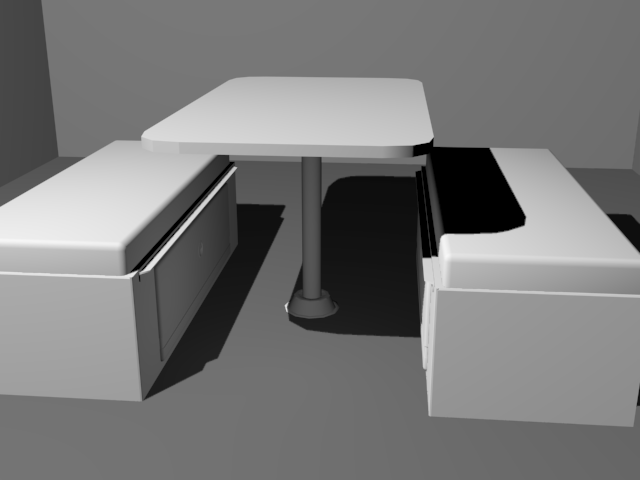
Since we are waiting on models for N'Ferno, the firefighting game, and some more of the code base I decided to do a couple personal projects. I decided to start a small modeling project, and a larger code/design project. For the modeling I started modeling components of a camper van I own. I figured it was something I have ready access to and should be a nice little project. I wanted to do somewhat low poly, though have enough to make the objects look nice without going into a lot of detail. I finished up the dinette(the table and seats) and am working on the cabinet where the stove, fridge, sink, and electrical stuff is.
Here is the dinette:
When I get done with all of the models I want to go through and texture everything. Since I think texturing is my weakest point, this should be a good little exercise.
For my other project I had an idea to make a program to help people keep track of their long term food stores and medical supplies. This could be useful if you are prepping for the apocalypse or if you have food stored away in case of flood/hurricane/tornado or other natural disaster. The program would offer basic functionality. You would have the ability to add items into either medical or food items. Each item will have an expiration date, quantity, subcategory, and name. When viewing the list it will let you know if a particular item is getting close to its expiration date. There will also be a search function where you can search by subcategory(i.e. under food would be: grains, beans, meat, etc...) to help keep track of what items you have.
Due to the fact I haven't learned any other language besides UnrealScript and AS3 I decided to make it using UDK. I realize it isn't the best platform to make something like that in, but it is what I know. Eventually I will sit down and learn C++ or another language, but for now I'm working on expanding my knowledge of how to do things using UDK.
When I have the main body built I will post some pictures and possibly some code that I used to achieve it.
Since we are waiting on models for N'Ferno, the firefighting game, and some more of the code base I decided to do a couple personal projects. I decided to start a small modeling project, and a larger code/design project. For the modeling I started modeling components of a camper van I own. I figured it was something I have ready access to and should be a nice little project. I wanted to do somewhat low poly, though have enough to make the objects look nice without going into a lot of detail. I finished up the dinette(the table and seats) and am working on the cabinet where the stove, fridge, sink, and electrical stuff is.
Here is the dinette:
When I get done with all of the models I want to go through and texture everything. Since I think texturing is my weakest point, this should be a good little exercise.
For my other project I had an idea to make a program to help people keep track of their long term food stores and medical supplies. This could be useful if you are prepping for the apocalypse or if you have food stored away in case of flood/hurricane/tornado or other natural disaster. The program would offer basic functionality. You would have the ability to add items into either medical or food items. Each item will have an expiration date, quantity, subcategory, and name. When viewing the list it will let you know if a particular item is getting close to its expiration date. There will also be a search function where you can search by subcategory(i.e. under food would be: grains, beans, meat, etc...) to help keep track of what items you have.
Due to the fact I haven't learned any other language besides UnrealScript and AS3 I decided to make it using UDK. I realize it isn't the best platform to make something like that in, but it is what I know. Eventually I will sit down and learn C++ or another language, but for now I'm working on expanding my knowledge of how to do things using UDK.
When I have the main body built I will post some pictures and possibly some code that I used to achieve it.
Monday, August 26, 2013
Finally An Update!
I feel like I'm apologizing a lot in my posts recently for the irregular updates. I have indeed been working on things in the past month, but due to work and complications with where we are staying I haven't had much time to write up a post. I won't bore you with too many details, but my internet is very slow here...frustratingly slow.
Anyway, I finished up with the menus for N'Ferno and showed them to the rest of Pixel Jargon. They were met with approval, with just a few tweaks that I forgot about. Since then I have put them aside until we get some finalized code for a couple more features. There was only one major bug with the menus and I haven't been able to figure out what is causing it. It was a problem that we ran into when we were making menus and such for Umbra, but I can't remember if we fixed it or not. Basically, if you are holding a movement key and you pause the game, when you unpause the game the pawn will continue running in the direction you were pressing until you hit that button again. I've looked on the Epic Games' forums, but either we're the only ones to encounter this, or I'm not using the right keywords.
Also put on the back burner was my experiment with the custom input ini's. I posted on the forums asking if anyone had any solutions to the mouse problem I was experiencing, but not a single person responded. It seems like none of the problems I have ran into have been asked about in the forums.
Since I wasn't really working on the menus for the time being I decided to help the modeling team a little. I was assigned a pretty interesting street lamp. Given two reference images I had to come up with a design and do a low poly model of it. I realized it is really hard to model something that has all rounded edges and try and keep it under 100 polygons. This meant very little detail once the basic shape was done. Since I was so disheartened by the lack of detail in it I decided to do a slightly higher poly version for myself. This ended up being around 1500 polys, but I was able to explore the concept a lot more and I found a design I liked better than my original one.
Here are the reference images I was given:
This was the original composite reference I made t get started:
And this is what I came up with for my higher poly model:
Anyway, I finished up with the menus for N'Ferno and showed them to the rest of Pixel Jargon. They were met with approval, with just a few tweaks that I forgot about. Since then I have put them aside until we get some finalized code for a couple more features. There was only one major bug with the menus and I haven't been able to figure out what is causing it. It was a problem that we ran into when we were making menus and such for Umbra, but I can't remember if we fixed it or not. Basically, if you are holding a movement key and you pause the game, when you unpause the game the pawn will continue running in the direction you were pressing until you hit that button again. I've looked on the Epic Games' forums, but either we're the only ones to encounter this, or I'm not using the right keywords.
Also put on the back burner was my experiment with the custom input ini's. I posted on the forums asking if anyone had any solutions to the mouse problem I was experiencing, but not a single person responded. It seems like none of the problems I have ran into have been asked about in the forums.
Since I wasn't really working on the menus for the time being I decided to help the modeling team a little. I was assigned a pretty interesting street lamp. Given two reference images I had to come up with a design and do a low poly model of it. I realized it is really hard to model something that has all rounded edges and try and keep it under 100 polygons. This meant very little detail once the basic shape was done. Since I was so disheartened by the lack of detail in it I decided to do a slightly higher poly version for myself. This ended up being around 1500 polys, but I was able to explore the concept a lot more and I found a design I liked better than my original one.
Here are the reference images I was given:
This was the original composite reference I made t get started:
And this is what I came up with for my higher poly model:
The texture is just a sub-object material I put on so I could see the different elements better. I might add more on to this at a later date, but for now I am done with it. It served its purpose in helping me visualize what I wanted the very low poly version to look like.
That's all I have for now!
Sunday, July 21, 2013
My Troubles With A Custom Input
Since the Scaleform stuff for N'Ferno isn't due for a couple months I decided to try and figure out how to use a custom input ini in UDK. This would allow me to use a different file for holding what keys do what, for each project. That way I don't have to manually change the DefaultInput.ini every time I wanted to work on a different project. This involved creating a new Input class, referencing it in the PlayerController default properties, then setting up a default input .ini with the new keybinds.
Once I got all of those set up I went to test it, and I couldn't turn with the mouse. All of the other custom keybinds worked perfectly. I could click with the mouse, just not move the camera around. I spent a couple days just trying different combinations of code in the .ini itself, to no avail. If anyone has any idea how mouse movement is handled in Unrealscript let me know. I could hardly find anything on using custom inputs besides changing the bindings in the DefaulInput.ini.
On another note, I started retrofitting the upgrade screen a while ago to work with N'Ferno and realized that I'm going to have to redo a lot of the structure. I decided to do this since N'Ferno won't need that robust of an upgrade system, and I can also trim it down some so the file size is smaller. It shouldn't take me very long to get that put back together nicely.
Well, that's all for now. Thank you for reading my blog!
Once I got all of those set up I went to test it, and I couldn't turn with the mouse. All of the other custom keybinds worked perfectly. I could click with the mouse, just not move the camera around. I spent a couple days just trying different combinations of code in the .ini itself, to no avail. If anyone has any idea how mouse movement is handled in Unrealscript let me know. I could hardly find anything on using custom inputs besides changing the bindings in the DefaulInput.ini.
On another note, I started retrofitting the upgrade screen a while ago to work with N'Ferno and realized that I'm going to have to redo a lot of the structure. I decided to do this since N'Ferno won't need that robust of an upgrade system, and I can also trim it down some so the file size is smaller. It shouldn't take me very long to get that put back together nicely.
Well, that's all for now. Thank you for reading my blog!
Subscribe to:
Posts (Atom)